
Introduction
Most software projects don’t fail because the code is bad — they fail because requirements, architecture, and tests slowly drift apart. Use Case Driven Development (UCDD) keeps them locked together by treating use cases as first-class contracts that directly drive architecture, code structure, and test suites. You might know this approach as Specification Driven Development — the idea is the same: formal, executable specifications are the single source of truth, and everything else flows from them.
In this walkthrough, we build FairSplit, a client-side expense splitting web app, following the UCDD workflow end to end.
- Phase 0 — Project Inception & Clarifying the Vision
- Phase 1 — Requirements Capture (Actors & Use Cases)
- Phase 2 — Define Architecture & Evaluate Options
- Phase 3 — Requirements Refinement (Formal Specifications)
- Phase 4 — Codebase Structure & Implementation
Phase 0 · Project Inception & Clarifying the Vision
Every solid architecture starts with a clear product intent. Before jumping into frameworks or schemas, we formulate the core problem–solution pair and set initial boundaries.
The Inception Prompt
We kicked off by clarifying the core vision:
i want to create an application FairSplit step by step. First help me to define a clear vision statement. My idea is: "FairSplit is a lightweight, zero-friction group expense management application designed to track shared costs and compute optimal debt settlement paths with minimal transactions."
The Initial Mockup
Before writing formal contracts, we capture the intuitive interaction model in an informal mockup:
+-------------------------------------------------------------+
| FairSplit - Group Expense Splitter                          |
+-------------------------------------------------------------+
| [ Weekend Trip to Alps ]                      Total: €450.00|
| Participants: Alice, Bob, Charlie                           |
+-------------------------------------------------------------+
| Recent Expenses:                                            |
|  - Grocery Run (€120.00, paid by Alice, split equally)      |
|  - Mountain Hut (€300.00, paid by Bob, split equally)       |
|  - Coffee (€30.00, paid by Charlie, split equally)          |
+-------------------------------------------------------------+
| Net Balances:                                               |
|  * Alice:   -€30.00 (Paid €120, Share €150)                 |
|  * Bob:    +€150.00 (Paid €300, Share €150)                 |
|  * Charlie:-€120.00 (Paid €30,  Share €150)                 |
+-------------------------------------------------------------+
| Suggested Settlements (Minimal Transactions):               |
|  -> Charlie pays Bob €120.00                                |
|  -> Alice pays Bob €30.00                                   |
+-------------------------------------------------------------+
Core Value Pillars
From this mockup we distilled four guiding pillars: Zero Friction (no account creation needed), Deterministic Clarity (transparent arithmetic), Debt Minimization (fewest pairwise transfers), and Local-First (browser local storage, no server dependency).
The full vision and scope boundaries live in VISION.md.
Phase 1 · Requirements Capture (Actors & Use Cases)
Equipping the Agent with Domain Skills
To keep requirements rigorous and architecture sharp, we add specialized skills to the workspace under .agents/skills/:
use-case-expert: Formal requirements engineering, unambiguous flow phrasing, contract modeling.use-case-implementer: Translating use case contracts into Clean Architecture code.codebase-design: Shared vocabulary for designing deep modules — interfaces, seams, adapters, and depth. A natural complement for architecture work.domain-modeling: Builds and sharpens the project’s domain model, maintains the glossary (CONTEXT.md), and records architectural decisions (ADRs).grill-with-docs: A relentless interview mode that pressure-tests your plan or design, creating ADRs and glossary entries as it goes.
The last three skills are by Matt Pocock and integrate seamlessly with the use case workflow. The codebase-design and domain-modeling skills are particularly valuable during architecture phases, providing a consistent design vocabulary the AI actually follows. And when you’re stuck — whether on requirements, architecture, or user experience — the /grill-with-docs command is your escape hatch: it runs an adversarial interview that forces you and the agent to confront every assumption until the path forward is clear.
Identifying Actors and Scope
With the vision set, we prompt the requirements skill to extract actors and functional boundaries — with a human review gate before writing documents:
/use-case-expert please analyze my VISION and identify actors and use cases. let me check the identified use cases before writing
Output
The analysis identified two actors and three core use cases:
- Actors:
Organiser(sets up the group) andParticipant(records expenses, reviews settlements). - Use Cases:
UC-001: Create Expense Group,UC-002: Add Expense,UC-003: View Balances & Settlements.
The full breakdown including backlog candidates is in identified-use-cases.md.
Phase 2 · Define Architecture & Evaluate Options
Before writing specifications or code, we need a concrete architectural model. In UCDD, each use case becomes a first-class citizen — an isolated interactor with explicit input/output boundaries and zero direct dependency on UI or storage.
Starting the Architecture Discussion
We engage the domain modeling skill to evaluate architecture patterns and persistence:
/domain-modeling i need to define the architecture for my application. please let's discuss options.
i like option 1. what do you suggest for the data storage?
Selected Architecture
- Clean / Hexagonal Architecture with a pure TypeScript domain core (
Group,Expense,SplitCalculator,SettlementEngine) completely decoupled from UI or persistence. - Dual-Adapter Repository Seam (
IGroupRepository):LocalStorageGroupRepositoryfor production,InMemoryGroupRepositoryfor fast, hermetic tests.
Formalizing Decisions
With style and persistence agreed, we generate the formal documentation:
let's document the architectural decisions and findings for the project as basis for the implementation..
This produced a clean separation between domain language, decisions, and blueprints:
- Domain Glossary: CONTEXT.md
- ADRs:
- Architecture Deep Dives:
- Architecture Overview (layers, folder structure, dependency rules)
- Architectural Options (trade-off matrix)
Phase 3 · Requirements Refinement (Formal Specifications)
In agile teams, requirements often collapse into one-line user stories. While stories communicate intent, they fail as architectural blueprints — they omit edge cases, leave error handling to guesswork, and provide no testable matrix. In UCDD, each use case is expanded into a formal behavioral contract before writing any application code.
1. Generating Formal Specifications
We prompt the use-case-expert skill:
/use-case-expert please formalise the identified use cases UC-001, UC-002, and UC-003 into formal use case specifications. Ensure strict preconditions, postconditions, atomic step-by-step flows, divergence points for all error cases, and UI element mappings.
The initial specs are available on GitHub (pinned to commit d1e110f):
2. The Anatomy of a Formal Use Case Contract
Every use case follows a strict template:
┌──────────────────────────────────────────────────────────────────────────┐
│  Use Case Metadata (ID, Name, Primary Actor, Brief Description)          │
├──────────────────────────────────────────────────────────────────────────┤
│  Preconditions (PRE1..n) & Postconditions (POST1..n)                     │
│  - Verifiable state transitions (e.g., storage updated, state valid)     │
├──────────────────────────────────────────────────────────────────────────┤
│  Basic Flow (Happy Path)                                                 │
│  - Strict Actor -> System alternating atomic steps                       │
├──────────────────────────────────────────────────────────────────────────┤
│  Alternative Flows (Divergence & Edge Branches)                          │
│  - Divergence Point + Condition -> Step-by-step recovery or exit         │
├──────────────────────────────────────────────────────────────────────────┤
│  Data Requirements & UI Functional Sketch                                │
│  - Exact input bindings [Field Name] and interface controls              │
└──────────────────────────────────────────────────────────────────────────┘
The key ingredients are: verifiable pre/postconditions (explicit system invariants), atomic alternating steps between actor and system (no vague words like “as needed”), deterministic divergence points (every validation failure branches explicitly), and UI data bindings (field names in brackets map directly to frontend elements).
3. Visual UI Sketches: From Bullet Points to Wireframes
A common pitfall with AI-generated specs is settling for text-only UI descriptions. In our first pass, the agent produced dry bullet lists of field names — technically correct but useless for conveying layout and interaction states.
The Fix
i see the UI Sketches as text only and want to get a better idea. (Looks like AI was a bit lazy here). Please provide concrete ASCII wireframe blueprints for all use cases showing spatial layouts, modal interactions, and split calculation states.
UC-001: Group Creation Wireframe
+-----------------------------------------------------------------------+
|  FairSplit                                         [+ New Group]      |
+-----------------------------------------------------------------------+
|                                                                       |
|  CREATE NEW EXPENSE GROUP                                             |
|  Set up a shared ledger with your group in seconds.                   |
|                                                                       |
|  Group Name:                                                          |
|  [ Summer Roadtrip 2026_________________________________________ ]    |
|                                                                       |
|  Participants (min. 2):                                               |
|  1. [ Alice Enkelmann__________________________________ ]  [ x ]      |
|  2. [ Bob Miller_______________________________________ ]  [ x ]      |
|  3. [ Charlie Davis____________________________________ ]  [ x ]      |
|                                                                       |
|  [ + Add Participant ]                                                |
|                                                                       |
|  -------------------------------------------------------------------  |
|  [ Cancel ]                                   [ Create Group -> ]     |
|                                                                       |
+-----------------------------------------------------------------------+
The updated specs with wireframes are on GitHub (commit 897354c):
4. Why Formal Specs Accelerate Implementation
With contracts for UC-001, UC-002, and UC-003, each use case maps directly to an application interactor (e.g., AddExpenseUseCase.execute(request)). Basic and alternative flows form a complete test matrix — every branch becomes an automated test case. And the wireframes plus data bindings eliminate layout guesswork for frontend development.
5. Real-World Improvements & Spec Sharpening
Generating the first draft is only the beginning. Running a round of verification and deepening before coding prevents costly rework. We also created a supplementary specification to extract cross-cutting functional concerns (currency handling, rounding rules, storage constraints) from the architectural documents into a standalone requirements artefact — keeping architecture and functional requirements cleanly separated.
Here are battle-tested prompt patterns for refining specs:
| Intent | Skill | Example Prompt |
|---|---|---|
| Quality Review | /use-case-expert | /use-case-expert please review UC-001 Create Expense Group |
| Feature Inclusion | /use-case-expert | /use-case-expert please include "Optional Default Currency Selection" into UC-001 |
| Adversarial Deepening | /grill-with-docs | /grill-with-docs review UC-001 and interrogate all edge cases against our project docs |
| Architecture Alignment | /domain-modeling | /domain-modeling review architecture considering alluse cases |
| Supplementary Spec | /use-case-expert | /use-case-expert extract cross-cutting functional requirements from the architecture docs into a supplementary specification |
Phase 4 · Codebase Structure & Implementation
Before writing use case logic, we establish the project foundation, module seams, and test harness.
1. Context Minimization
A key principle in agentic development is keeping the AI’s context focused. Asking an agent to set up build tools, configure the compiler, establish test runners, and write business logic all at once leads to sloppy boundaries. By setting up the skeleton first — without any functionality — the agent focuses entirely on toolchain integrity, and subsequent use case implementations naturally find their place.
2. The Scaffolding Prompt
/codebase-design setup the initial code and test repository. do not yet code the functionality
3. Resulting Structure
The skeleton follows Clean Architecture layers:
expense-splitter/
├── package.json                              # Scripts: dev, build, test (Vitest)
├── tsconfig.json                             # Strict TS compiler & layer aliases (@domain/*, @usecases/*)
├── vite.config.ts                            # Vite & Vitest configuration with path resolution
├── src/
│   ├── domain/
│   │   ├── ports/
│   │   │   └── IGroupRepository.ts           # Persistence seam port
│   │   ├── errors/
│   │   │   └── DomainError.ts                # Base DomainError, ValidationError, NotFoundError
│   │   ├── value-objects/
│   │   │   └── Money.ts                      # Value object for integer-cent arithmetic
│   │   └── entities/
│   │       ├── Participant.ts                # Participant entity
│   │       ├── Expense.ts                    # Expense entity
│   │       └── Group.ts                      # Group aggregate root
│   ├── infrastructure/
│   │   └── storage/
│   │       └── InMemoryGroupRepository.ts    # In-memory adapter for testing
│   ├── usecases/                             # (Reserved for interactors & DTOs)
│   └── presentation/                         # (Reserved for UI & composition root)
└── tests/
    └── unit/
        ├── Money.test.ts                     # Integer-cent math & formatting
        └── InMemoryGroupRepository.test.ts   # Seam contract verification
4. Verifying the Foundation
Before coding any interactors, we confirm the skeleton is solid:
- Type Check:
npx tsc --noEmit→ 0 errors - Unit Suite:
npm test(Vitest) → 5 passed, all green in < 600ms
5. Structuring Code Along Use Cases
Instead of the usual layer-based layout (/controllers, /services, /models), UCDD organizes code and tests around the use cases themselves:
src/usecases/
├── create-group/
│   ├── CreateGroupDTO.ts         # Request / Response Contracts
│   └── CreateGroupUseCase.ts     # Interactor: Basic & Alternative Flows
├── add-expense/
│   ├── AddExpenseDTO.ts
│   └── AddExpenseUseCase.ts
└── settle-group/
    ├── SettleGroupDTO.ts
    └── SettleGroupUseCase.ts
tests/usecases/
├── CreateGroupUseCase.test.ts    # 1:1 Flow Test Suite
├── AddExpenseUseCase.test.ts
└── SettleGroupUseCase.test.ts
The Golden Rules:
- The interactor is the flow orchestrator — it executes the basic flow steps in sequence (validate, query, delegate to domain, persist).
- Alternative flows map to domain guards — every spec branch (e.g.,
AF 7.1 Custom Split Mismatch) becomes a validation branch or domain error class. - 1:1 test traceability — test suites mirror the spec document, grouping tests under
describe('Basic Flow')anddescribe('Alternative Flow X.Y')so every specified path has a matching executable test.
6. The 1:1 Test Traceability Pattern
When requirements are formalized into numbered steps and alternative flows, testing stops being guesswork. Each describe block in the test suite maps to a flow in the specification — basic flow steps become happy-path assertions, and every alternative flow gets its own describe block verifying the exact error condition and recovery behavior documented in the spec.
7. Implementation Prompts
To implement cleanly without drifting from specifications:
| Approach | Prompt | When to Use |
|---|---|---|
| One Use Case at a Time | /use-case-implementer implement UC-001 Create Expense Group with full test coverage mapped to Basic and Alternative flows | Focused TDD — verify each interactor before moving on. |
| Full Batch | /use-case-implementer implement all use cases in docs/usecases/ | When domain entities and ports are already verified. |
| Test-First | /use-case-implementer generate the unit test suites for UC-001, UC-002, UC-003 before implementing the interactors | Pure TDD — lay down the red test matrix first. |
8. Recommendation
I prefer implementing use cases one by one. Why?
- It lets my human brain focus on one piece of functionality at a time.
- It lets the AI focus on one piece of functionality at a time — each use case gets its own session.
- Test coverage builds up incrementally with clear checkpoints at every step.
9. Finalizing the Implementation
After implementing all vertical slices, we finalize by validating cross-cutting invariants and running the full suite:
/use-case-implementer finalize the initial implementation for all use cases (UC-001, UC-002, UC-003): verify interactor contracts, ensure clean repository wiring, run the full test suite, and check for any unhandled edge cases or type discrepancies across the domain boundaries.
One hiccup: this step produced the index.ts barrel but forgot the index.html required by Vite. The fix was simple — prompting run the application made the agent create the missing file and attempt to launch it.
10. AI vs. the Wireframe
Here’s what the AI actually produced for the UI:
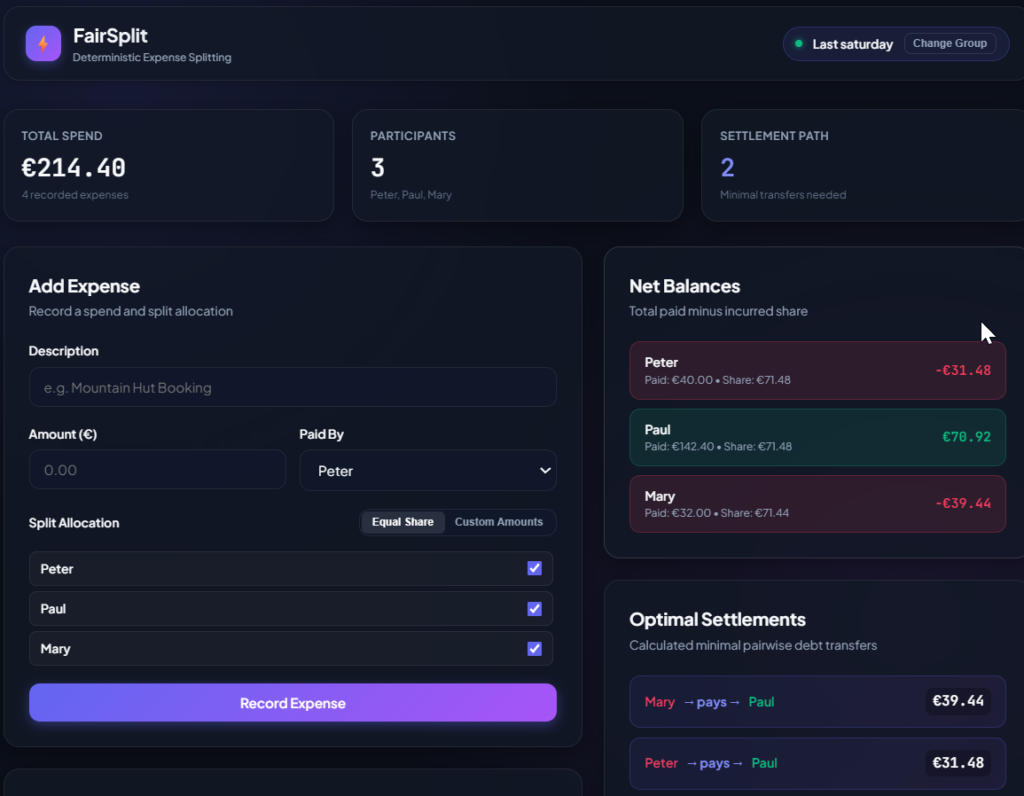

Notice anything? This looks nothing like the ASCII wireframes we carefully specified in our use case documents. The layout, the card styling, the dark-theme color palette — none of it was asked for. The AI has its own head when it comes to visual design; give it a “build the UI” prompt and it will happily improvise an entirely different look-and-feel.
This isn’t necessarily a problem. If close adherence to the UI specs is required — say, you’re matching an existing brand or a designer’s Figma — you can steer the output with a targeted prompt (e.g., “match the wireframe layout from UC-003 exactly, plain light theme, no cards”). Once the AI settles on the corrected design, it will keep producing consistent results from that point forward. But if you don’t correct it, you get whatever it finds aesthetically pleasing that day.
What’s Next
We now have formal contracts, clean layers, isolated interactors, and 40 passing tests. The core logic is solid. What we haven’t covered yet: end-to-end browser journey tests, automated screenshot pipelines, storage hardening across reloads, and a full requirements traceability matrix.
But the real promise of UCDD goes far beyond greenfield projects. Imagine feeding an existing codebase into the same workflow — reverse-engineering living use case contracts from legacy code, surfacing hidden business rules, and reconstructing the specification that was never written. Or picture evolving a shipped product: changing a use case, watching the ripple propagate through architecture, interactors, and test suites, and knowing exactly what breaks and what holds. That’s where UCDD stops being a methodology and starts becoming a superpower.
Part 2 is coming — stay tuned.